Liberal Forum
Archive
‹
Political Chat Rooms
‹
No Holds Barred Political Forum
‹
A Thread Celebrating, Acknowledging and Thanking LF's largest Donor
A Thread Celebrating, Acknowledging and Thanking LF's largest Donor

By Cannonpointer
9 Feb 2022 9:17 pm in No Holds Barred Political Forum

10 Feb 2022 8:53 pm
10 Feb 2022 9:03 pm
You mean like this ?Cannonpointer » 10 Feb 2022, 7:59 pm » wrote: ↑ So, the first thing is to hit "Disable word processor". It's just to the right bottom of the box, an inch below where this post ends.
Then, copy the entire heading, from [bracket to bracket]. That's your header. Highlight it, and hit control x to capture and control v to put it back.
Then, put an end quote box at the end of the very first segment. An end quote box is the symbol / and the word quote, like so: /quote, between brackets. The brackets look like this [ and this ].This is what's called an embedded command. It doesn't show up in the text - it provides a function.
DoneCannonpointer » 10 Feb 2022, 7:59 pm » wrote: ↑ Respond to that segment, placing YOUR text immediately below the end quote box..
Now, hit control v again, to head the next snippet. That will put the header in again, above the text you are responding to.
Go to the end of the snippet, and put an end quote box there. Respond to that portion of the quote.
Let's see the result.Cannonpointer » 10 Feb 2022, 7:59 pm » wrote: ↑ Hit control v again, and it will head the remaining snippet. there should already BE an end quote box there. Go outside of the end quote box and respond.
When you do a multi quote like that, instead of hitting submit, you should hit preview, to see if maybe you accidentally left the "e" off the word quote, or spelled it qote, or some such error. If that happened, it is no longer a function command - it is now text. And the program will make a mash of your post - which you can fix by finding and correcting the error - and be sure to undo any adjustments the program made to compensate for your error, such as adding another end quote box.
Is that easy to follow?
It sounds complex, but it's very easy once you have mastered it.
10 Feb 2022 9:06 pm

You still did something off - I'm going to go in and edit. it is still presenting as post within post, leaving nothing to quote.
It take a minute to get the knack.
When you complain, ur friends roll their eyes and ur enemies rejoice
"Because I SAY I am" is a todler's tantrum, not "science"
You cannot betray me - only yourself, to me.
Who cuts off your dick is not a friend
An opinion you won't defend is not your own
Humanity's Law of the Jungle: Survival NOT of the fittest, but of the tribe
When peeing in the pool, stand on the edge
If gender is not sex, why should a gender claim change what sex you shower with?
"Because I SAY I am" is a todler's tantrum, not "science"
You cannot betray me - only yourself, to me.
Who cuts off your dick is not a friend
An opinion you won't defend is not your own
Humanity's Law of the Jungle: Survival NOT of the fittest, but of the tribe
When peeing in the pool, stand on the edge
If gender is not sex, why should a gender claim change what sex you shower with?
10 Feb 2022 9:07 pm
I think I got it !Cannonpointer » 10 Feb 2022, 9:51 pm » wrote: ↑ Okay - I straightened in out. You had put the end quote box after your response, instead of before your response.
This is pretty easy man.Cannonpointer » 10 Feb 2022, 9:51 pm » wrote: ↑ Go back and respond to my post AGAIN. See if you get it perfect.
Even for me !
Thanks a lot man !
10 Feb 2022 9:10 pm
Okay, this time, you did a control v and pasted my header in the middle of a block, without end-quoting and without comment before the next header.
And you also did a quote box instead of an end quote box - leaving out the /.
Try it again!

When you complain, ur friends roll their eyes and ur enemies rejoice
"Because I SAY I am" is a todler's tantrum, not "science"
You cannot betray me - only yourself, to me.
Who cuts off your dick is not a friend
An opinion you won't defend is not your own
Humanity's Law of the Jungle: Survival NOT of the fittest, but of the tribe
When peeing in the pool, stand on the edge
If gender is not sex, why should a gender claim change what sex you shower with?
"Because I SAY I am" is a todler's tantrum, not "science"
You cannot betray me - only yourself, to me.
Who cuts off your dick is not a friend
An opinion you won't defend is not your own
Humanity's Law of the Jungle: Survival NOT of the fittest, but of the tribe
When peeing in the pool, stand on the edge
If gender is not sex, why should a gender claim change what sex you shower with?
10 Feb 2022 9:11 pm
JinnMartini » 10 Feb 2022, 10:07 pm » wrote: ↑ I think I got it !
This is pretty easy man.
Even for me !
Thanks a lot man !

When you complain, ur friends roll their eyes and ur enemies rejoice
"Because I SAY I am" is a todler's tantrum, not "science"
You cannot betray me - only yourself, to me.
Who cuts off your dick is not a friend
An opinion you won't defend is not your own
Humanity's Law of the Jungle: Survival NOT of the fittest, but of the tribe
When peeing in the pool, stand on the edge
If gender is not sex, why should a gender claim change what sex you shower with?
"Because I SAY I am" is a todler's tantrum, not "science"
You cannot betray me - only yourself, to me.
Who cuts off your dick is not a friend
An opinion you won't defend is not your own
Humanity's Law of the Jungle: Survival NOT of the fittest, but of the tribe
When peeing in the pool, stand on the edge
If gender is not sex, why should a gender claim change what sex you shower with?
10 Feb 2022 9:18 pm
Okay, dude - part deux.JinnMartini » 10 Feb 2022, 10:07 pm » wrote: ↑ I think I got it !
This is pretty easy man.
Even for me !
Thanks a lot man !
Let's say that you are inserting a quote from a SOURCE, and not only quoting from someone's post.
That also needs a header - but you can do that with just a quote box. the start bracket: [ and the end bracket: ], with the word quote between them. Then you paste the text, and then you finish with an end quote box.
Here is an example.
AND... there's a short cut. Look up above my name at the top of this box (when responding, not now). See that B I U? Then after that there is a quote mark ". If you click on THAT, it GIVES you a box, then you just control v whatever source you copied into it.The rain in Spain falls mainly in the plain.
To copy from a source, Control c, rather than Control x, is the way to go, since the page you are copying doesn't allow you to Control x. The only reason I use control x is to verify capture.
Also, know this - very important. Any time you get in a fix, you can reach right into your bag of tricks with Control z. Control z is an undo button. You hit it once it makes the page forget your last move. You hit it twice, last two moves. Thrice, last three. VERY handy.
When you complain, ur friends roll their eyes and ur enemies rejoice
"Because I SAY I am" is a todler's tantrum, not "science"
You cannot betray me - only yourself, to me.
Who cuts off your dick is not a friend
An opinion you won't defend is not your own
Humanity's Law of the Jungle: Survival NOT of the fittest, but of the tribe
When peeing in the pool, stand on the edge
If gender is not sex, why should a gender claim change what sex you shower with?
"Because I SAY I am" is a todler's tantrum, not "science"
You cannot betray me - only yourself, to me.
Who cuts off your dick is not a friend
An opinion you won't defend is not your own
Humanity's Law of the Jungle: Survival NOT of the fittest, but of the tribe
When peeing in the pool, stand on the edge
If gender is not sex, why should a gender claim change what sex you shower with?
10 Feb 2022 9:30 pm
Another thing. Simple thing, but in case you don't know it already - hit reply to this, then hit the back arrow.JinnMartini » 10 Feb 2022, 10:07 pm » wrote: ↑ I think I got it !
This is pretty easy man.
Even for me !
Thanks a lot man !
Knowing your way out is as important as knowing your way in. For example, if you are responding to something bob said to jim, you will only see bob's text. So, let's say you want to remember precisely what jim said to bob that occasioned the reply. You can hit back arrow, refresh yourself, then hit reply again.
OR...
You can open a new browser window and go to the post, and look there. You can also COPY that post and insert it in what you are responding to. It will appear as quote within quote - like this:
**** offNo, you **** off.
When you complain, ur friends roll their eyes and ur enemies rejoice
"Because I SAY I am" is a todler's tantrum, not "science"
You cannot betray me - only yourself, to me.
Who cuts off your dick is not a friend
An opinion you won't defend is not your own
Humanity's Law of the Jungle: Survival NOT of the fittest, but of the tribe
When peeing in the pool, stand on the edge
If gender is not sex, why should a gender claim change what sex you shower with?
"Because I SAY I am" is a todler's tantrum, not "science"
You cannot betray me - only yourself, to me.
Who cuts off your dick is not a friend
An opinion you won't defend is not your own
Humanity's Law of the Jungle: Survival NOT of the fittest, but of the tribe
When peeing in the pool, stand on the edge
If gender is not sex, why should a gender claim change what sex you shower with?
10 Feb 2022 9:52 pm
No I did not.
With the proper apologies, I'd be back there as well.
I do not hold any grudge to anyone . . . especially not when it's about money.
For which I don't really give a ****.
But you hurt my family, including my dogs . . . you'll know how vicious and merciless I can be.
------------------------------------------------------------------------------------------------------------------------------
You know the best "legal" killing ?
You kill this guy(s) who molest you, your daughter, wife, whatever . . . you stuff them in a freezer -I got four large ones that can easily accommodate the fattest ****, that freeze as low as 31 °Fahrenheit.
When frozen you slice them thin with an industrial cattle slicer.
Got one.
Everyday say 3, 4 or 5 maybe six pounds.
Flesh should not thaw during the operation.
Put the rest back in the freezer.
The slices you put in a mincing machine before they thaw.
The result you flush down the toilet, where they belong.
Depending on the number of bastards you removed from the earth . . . you ought to be done in a week or so.
No stench, no mess with blood all over the place . . . no ****.
When you're done you dump the freezers, the slicing machine and mincing machine in a landfill or recycle them at your local metal recycling factory.
2. You buy new machinery . . . just in case.
10 Feb 2022 9:57 pm
Cannonpointer » 10 Feb 2022, 10:30 pm » wrote: ↑ Another thing. Simple thing, but in case you don't know it already - hit reply to this, then hit the back arrow.
Knowing your way out is as important as knowing your way in. For example, if you are responding to something bob said to jim, you will only see bob's text. So, let's say you want to remember precisely what jim said to bob that occasioned the reply. You can hit back arrow, refresh yourself, then hit reply again.
OR...
You can open a new browser window and go to the post, and look there. You can also COPY that post and insert it in what you are responding to. It will appear as quote within quote - like this:
I'll check this out tomorrow.
Thanks buddy !

10 Feb 2022 11:03 pm
Sorry about that Jinn.JinnMartini » 10 Feb 2022, 7:39 pm » wrote: ↑Can you teach me an easy way to reply to a post in segments?
I asked to @Misty but her way is too complicated for me.
viewtopic.php?f=7&t=64217
Thanks anyway, @Misty
Let me try and simplify it.
I'll use one of your posts to demonstrate:
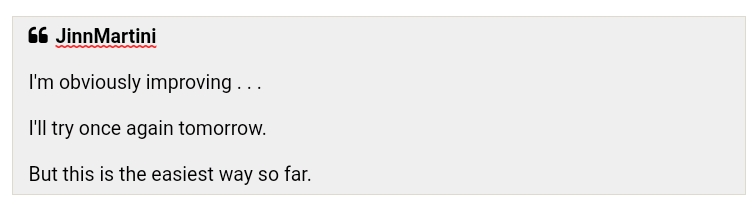
Hit the quotation marks to reply to the post, then hit SOURCE.
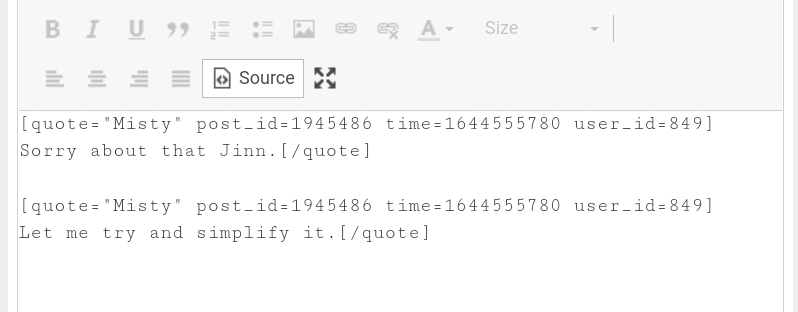
It will look like this:
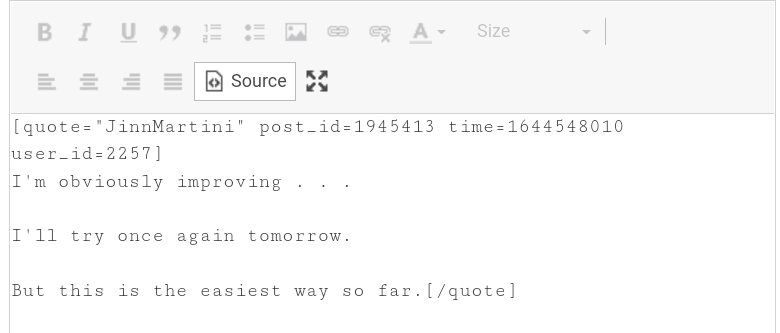
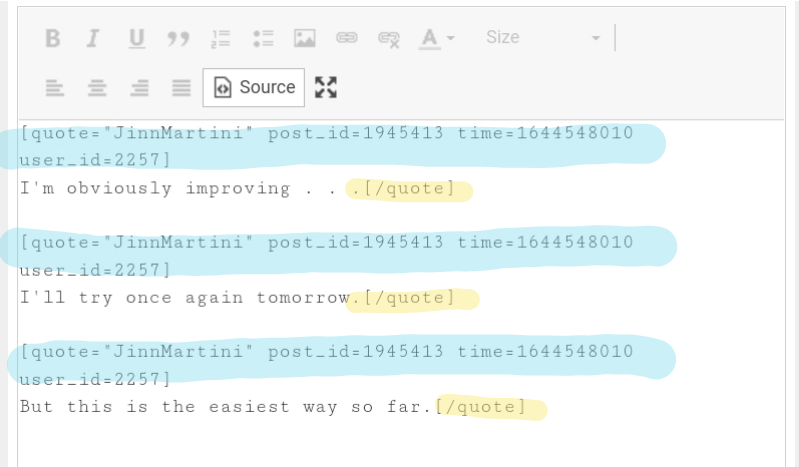
To separate the segments use Copy and Paste to make sure each segment starts with the header (highlighted in blue) and ends in a close quote tag (highlighted in yellow) like this:
Hit SOURCE again and it will look like this:
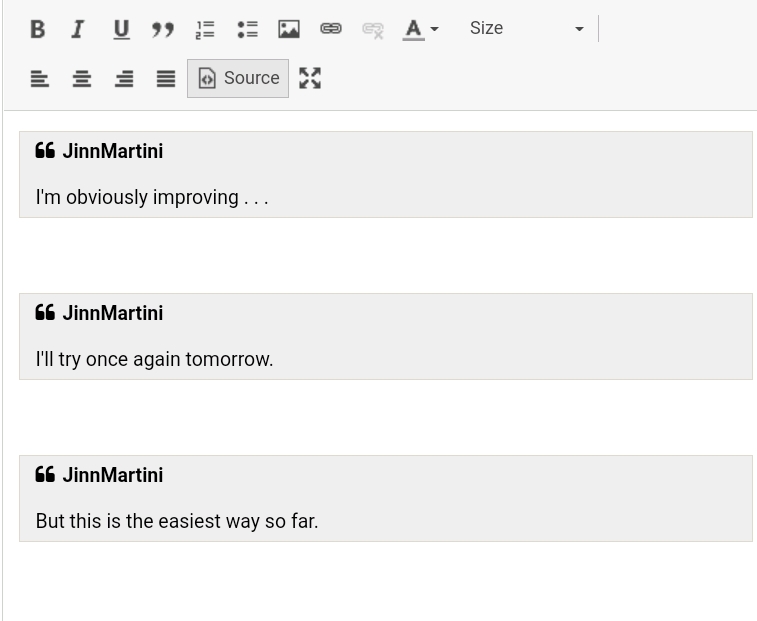
Then you can type your reply to each segment.
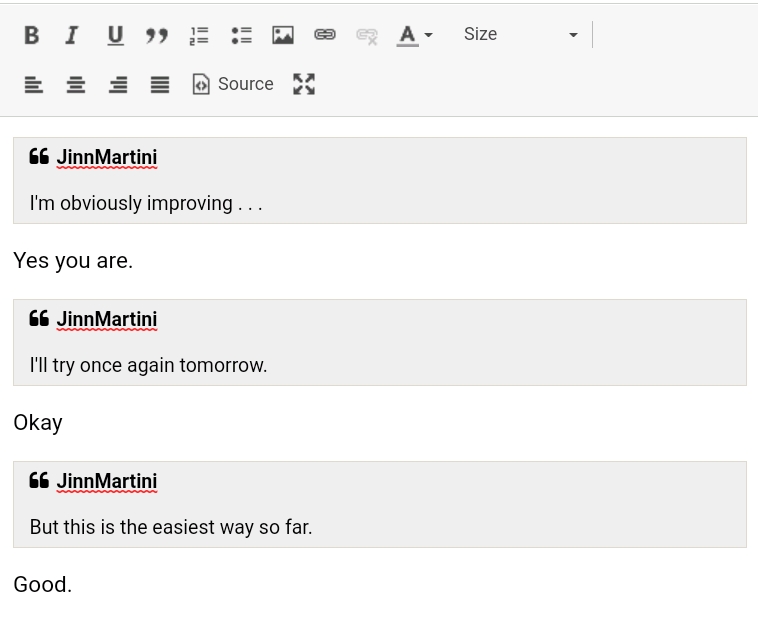
I hope that works for you.
10 Feb 2022 11:15 pm
Misty » 11 Feb 2022, 12:03 am » wrote: ↑ Sorry about that Jinn.
Let me try and simplify it.
I'll use one of your posts to demonstrate:
Hit the quotation marks to reply to the post, then hit SOURCE.
It will look like this:
To separate the segments use Copy and Paste to make sure each segment starts with the header (highlighted in blue) and ends in a close quote tag (highlighted in yellow) like this:
Hit SOURCE again and it will look like this:
Then you can type your reply to each segment.
I hope that works for you.
Damn. I gotta study that method - never knew that.
When you complain, ur friends roll their eyes and ur enemies rejoice
"Because I SAY I am" is a todler's tantrum, not "science"
You cannot betray me - only yourself, to me.
Who cuts off your dick is not a friend
An opinion you won't defend is not your own
Humanity's Law of the Jungle: Survival NOT of the fittest, but of the tribe
When peeing in the pool, stand on the edge
If gender is not sex, why should a gender claim change what sex you shower with?
"Because I SAY I am" is a todler's tantrum, not "science"
You cannot betray me - only yourself, to me.
Who cuts off your dick is not a friend
An opinion you won't defend is not your own
Humanity's Law of the Jungle: Survival NOT of the fittest, but of the tribe
When peeing in the pool, stand on the edge
If gender is not sex, why should a gender claim change what sex you shower with?
10 Feb 2022 11:35 pm
Basically you just have to make sure that each segment starts with the header and ends in a close quote tag.Cannonpointer » 11 Feb 2022, 12:15 am » wrote: ↑Damn. I gotta study that method - never knew that.Misty » 11 Feb 2022, 12:03 am » wrote: ↑ Sorry about that Jinn.
Let me try and simplify it.
I'll use one of your posts to demonstrate:
Hit the quotation marks to reply to the post, then hit SOURCE.
It will look like this:
To separate the segments use Copy and Paste to make sure each segment starts with the header (highlighted in blue) and ends in a close quote tag (highlighted in yellow) like this:
Hit SOURCE again and it will look like this:
Then you can type your reply to each segment.
I hope that works for you.
I use Copy and Paste to accomplish that goal.
10 Feb 2022 11:47 pm
Misty » 11 Feb 2022, 12:35 am » wrote: ↑ Basically you just have to make sure that each segment starts with the header and ends in a close quote tag.
I use Copy and Paste to accomplish that goal.
Okay, let me ax this.
Other than changing the appearance of the font, what is the functionality of involving the source button?
I went and tried it, and I didn't see any change in the number of required steps or functionality enhancement. It didn't DO anything - that I could see, - other than change the appearance of the text.
When you complain, ur friends roll their eyes and ur enemies rejoice
"Because I SAY I am" is a todler's tantrum, not "science"
You cannot betray me - only yourself, to me.
Who cuts off your dick is not a friend
An opinion you won't defend is not your own
Humanity's Law of the Jungle: Survival NOT of the fittest, but of the tribe
When peeing in the pool, stand on the edge
If gender is not sex, why should a gender claim change what sex you shower with?
"Because I SAY I am" is a todler's tantrum, not "science"
You cannot betray me - only yourself, to me.
Who cuts off your dick is not a friend
An opinion you won't defend is not your own
Humanity's Law of the Jungle: Survival NOT of the fittest, but of the tribe
When peeing in the pool, stand on the edge
If gender is not sex, why should a gender claim change what sex you shower with?
10 Feb 2022 11:52 pm
I don't know.Cannonpointer » 11 Feb 2022, 12:47 am » wrote: ↑Okay, let me ax this.Misty » 11 Feb 2022, 12:35 am » wrote: ↑ Basically you just have to make sure that each segment starts with the header and ends in a close quote tag.
I use Copy and Paste to accomplish that goal.
Other than changing the appearance of the font, what is the functionality of involving the source button?
I went and tried it, and I didn't see any change in the number of required steps or functionality enhancement. It didn't DO anything - that I could see, - other than change the appearance of the text.
That's just the way I've always done it.
I'll have to try it without doing that.
10 Feb 2022 11:55 pm
Misty » 11 Feb 2022, 12:52 am » wrote: ↑ I don't know.
That's just the way I've always done it.
I'll have to try it without doing that.
It felt like an extra step, and I didn't like the appearance of the text. But that is because I have always done it the other way.
For you, my way might feel awkward.
When you complain, ur friends roll their eyes and ur enemies rejoice
"Because I SAY I am" is a todler's tantrum, not "science"
You cannot betray me - only yourself, to me.
Who cuts off your dick is not a friend
An opinion you won't defend is not your own
Humanity's Law of the Jungle: Survival NOT of the fittest, but of the tribe
When peeing in the pool, stand on the edge
If gender is not sex, why should a gender claim change what sex you shower with?
"Because I SAY I am" is a todler's tantrum, not "science"
You cannot betray me - only yourself, to me.
Who cuts off your dick is not a friend
An opinion you won't defend is not your own
Humanity's Law of the Jungle: Survival NOT of the fittest, but of the tribe
When peeing in the pool, stand on the edge
If gender is not sex, why should a gender claim change what sex you shower with?
11 Feb 2022 12:01 am
OIC, I hit SOURCE and you hit Disable Word Processor.Cannonpointer » 11 Feb 2022, 12:55 am » wrote: ↑It felt like an extra step, and I didn't like the appearance of the text. But that is because I have always done it the other way.Misty » 11 Feb 2022, 12:52 am » wrote: ↑ I don't know.
That's just the way I've always done it.
I'll have to try it without doing that.
For you, my way might feel awkward.
Not much difference except for the look of the text and I have to hit SOURCE again before I can submit it, so it is one extra step.
11 Feb 2022 12:04 am
AH! That's right - it disables the word processor. So it's not at EXTRA step just a different one.Misty » 11 Feb 2022, 1:01 am » wrote: ↑ OIC, I hit SOURCE and you hit Disable Word Processor.
Not much difference except for the look of the text and I have to hit SOURCE again to go back to the normal look.
When you complain, ur friends roll their eyes and ur enemies rejoice
"Because I SAY I am" is a todler's tantrum, not "science"
You cannot betray me - only yourself, to me.
Who cuts off your dick is not a friend
An opinion you won't defend is not your own
Humanity's Law of the Jungle: Survival NOT of the fittest, but of the tribe
When peeing in the pool, stand on the edge
If gender is not sex, why should a gender claim change what sex you shower with?
"Because I SAY I am" is a todler's tantrum, not "science"
You cannot betray me - only yourself, to me.
Who cuts off your dick is not a friend
An opinion you won't defend is not your own
Humanity's Law of the Jungle: Survival NOT of the fittest, but of the tribe
When peeing in the pool, stand on the edge
If gender is not sex, why should a gender claim change what sex you shower with?
11 Feb 2022 12:11 am
Once you understand how BB Codes work it's not that complicated.Cannonpointer » 11 Feb 2022, 1:04 am » wrote: ↑AH! That's right - it disables the word processor. So it's not at EXTRA step just a different one.Misty » 11 Feb 2022, 1:01 am » wrote: ↑ OIC, I hit SOURCE and you hit Disable Word Processor.
Not much difference except for the look of the text and I have to hit SOURCE again to go back to the normal look.
However you get there, you get there.
But it's hard to explain to someone who is not familiar with BB Codes.

11 Feb 2022 5:42 am

All good if you're on municipal sewer. If you have a septic tank on your property, there may be a problem down the road.
Just trying to save someone a little "embarrassment"
Who is online
In total there are 3040 users online :: 7 registered, 12 bots, and 3021 guests
Registered users: Johnny You, Blackvegetable, ROG62, SouthernFried, Cannonpointer, Deezer Shoove, nefarious101
Bots: DuckDuckBot, Feeder, curl/7, CriteoBot, YandexBot, proximic, ADmantX, Applebot, Googlebot, facebookexternalhit, Mediapartners-Google, bingbot